

Your HubSpot Pipeline Is a Data Structure. Most Are Broken.
Your deal pipeline is a data structure. When stages, exit criteria, and required properties break, forecasting and AI produce garbage. Diagnose and fix it.

Peter Sterkenburg
HubSpot Solutions Architect & Revenue Operations expert. 20+ years B2B SaaS experience. Founder of HubHorizon.
Last Tuesday I watched a sales manager run a pipeline review off the HubSpot deal board. Forty-two open deals. The board looked full. Then we started clicking.
Deal #7: "Negotiation" stage, close date three months ago. No activity since November. Deal #14: $120K in "Proposal Sent" — no associated contacts. Not one. Nobody on the buying side was connected to this deal in HubSpot. Deal #23: "Qualified" for 97 days in a business that averages a 45-day cycle.
The manager asked the room: "What's real here?" Long pause. Nobody could answer with confidence, because the answer wasn't in the pipeline. The pipeline showed what reps had entered — or forgotten to enter — not what was actually happening in the deals.
That pipeline wasn't a sales problem. It was a data problem. And it's the same problem I see in every portal I analyse.
Your pipeline is a data structure
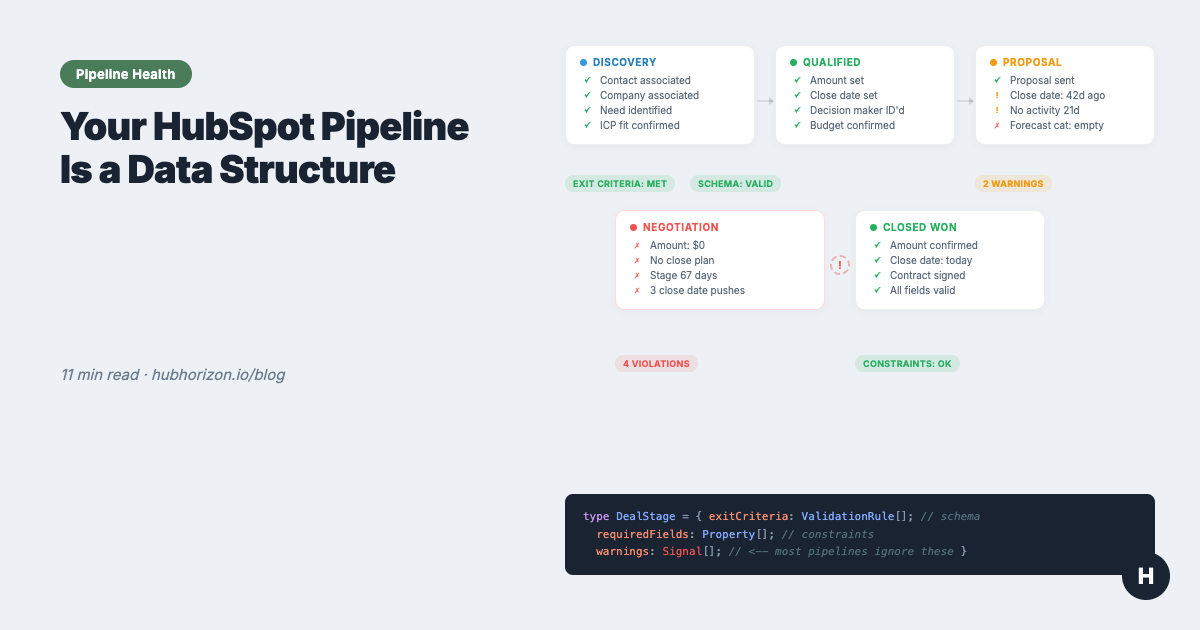
Think of it this way. Your deal stages are a schema — they define the shape of your data. Your exit criteria are validation rules — they determine what must be true before a record moves to the next state. Your required properties are integrity constraints — they ensure each record contains the minimum data needed to be useful.
When a database has a bad schema, every query returns garbage. Same thing happens with a broken pipeline. Reports pull from stages that don't mean what they should. Forecasts apply probabilities to deals that shouldn't be in those stages. AI models train on historical data where "Negotiation" meant everything from "we sent a quote" to "the deal is dead but nobody closed it."
I wrote about why forecasts go wrong when deal data is incomplete. That article covers the data layer — amounts, close dates, forecast categories. This article goes one level deeper: the pipeline architecture itself. The schema your data lives in.
Most teams inherit HubSpot's default stages — Appointment Scheduled, Qualified to Buy, Presentation Scheduled, Decision Maker Bought-In, Contract Sent, Closed Won, Closed Lost — and never redesign them. That's like running a production database with someone else's schema. It might work for a while. It won't scale.
The 6 deal health signals that actually matter
Deal health isn't a gut feeling. It's measurable. These six signals tell you whether a deal is progressing or dying, and every one of them can be checked in HubSpot without third-party tools.
1. A next step exists
Deals without clear next steps drift and die. A healthy deal has a scheduled future commitment — a meeting, a deliverable review, a decision date. Not "I'll follow up next week." A calendar event.
HubSpot check: hs_next_activity_date is populated and within 14 days. If there's no next activity, or the next step is vague and undated, the deal is coasting.
I see this constantly: a deal sits in "Proposal Sent" with no scheduled follow-up. The rep is waiting for the prospect to respond. The prospect moved on two weeks ago.
2. Activity velocity
How frequently are touchpoints happening — and are both sides participating? A healthy deal has regular, bi-directional activity. Emails sent and received. Meetings held. Calls logged.
HubSpot check: Look at the activity count on the deal timeline and the last activity date. Healthy deals in a mid-market cycle show 2+ logged activities per week with the most recent within 7 days. Below 1 per week, or a last activity date beyond 14 days, and the deal is going cold.
Email velocity — the frequency and reciprocity of email exchanges — is one of the strongest predictors of whether a deal closes. A deal with a full inbox of outbound emails and nothing coming back is not a healthy deal. It's a monologue.
3. Multi-threading
Is the rep talking to one person, or are multiple contacts engaged on the buying side? Single-threaded deals are fragile. If your one contact leaves, gets reassigned, or simply loses interest, the deal dies instantly.
HubSpot check: Count the associated contacts on the deal, and check whether contact roles are assigned. Healthy deals have 3+ associated contacts with defined roles. A deal with a single contact and no roles assigned is a single point of failure.
Multi-threading also tells you about the buying committee. A complex B2B sale involves champions, decision-makers, influencers, and sometimes blockers. If only one person is associated to the deal, the rep either hasn't mapped the committee or hasn't engaged it. Either way, the deal is at risk.
4. Access to power
Is a decision-maker involved? You can have excellent activity velocity with a champion who can't sign the contract. Deals stall in late stages because the person who actually approves the purchase hasn't been engaged.
HubSpot check: Look for a contact with the "Decision Maker" role associated to the deal. Better yet: check whether that decision-maker appears in recent activities — not just listed as a contact, but active in emails, meetings, or calls.
A deal in "Negotiation" where the decision-maker has never attended a meeting is not in Negotiation. It's in "Champion Likes Us." That's a different stage.
5. Stage velocity
How long has this deal been in its current stage compared to your average? Every pipeline has a natural rhythm — discovery takes X days, proposal takes Y days, negotiation takes Z days. When a deal exceeds 1.5x the average time for its current stage, something is wrong.
HubSpot check: Use hs_date_entered_[stagename] properties to calculate time in stage. Compare to your pipeline's average. HubSpot's deal stage duration reports surface this, or build a calculated property.
A deal that's been in "Qualification" for 60 days when your average is 12 isn't being qualified. It's parked.
6. Close date stability
How many times has the close date moved? A deal whose close date has shifted once is normal — timing adjustments happen. A deal whose close date has moved three or more times is telling you something: nobody actually knows when this deal will close.
HubSpot check: HubSpot doesn't natively count close date changes, but you can track pushes via a workflow that increments a custom counter property whenever the close date changes. Or compare the original create-date close date to the current one.
The forecasting cheat sheet covers close date stability in the context of forecast accuracy. Here the point is deal health: a deal with a wandering close date is a deal without a real timeline.
Pipeline warnings that predict deal death
The six signals above tell you about individual deal health. The warnings below are threshold-based rules that flag deals across your pipeline. They're the automated version of the experienced manager scanning the board and spotting problems.
The right thresholds depend on your sales cycle. What counts as "stalled" in a 90-day enterprise cycle is normal progress in a 14-day SMB motion.
| Warning | Short cycle (<45 days) | Mid-market (45-90 days) | Enterprise (90+ days) |
|---|---|---|---|
| No activity — no logged emails, calls, or meetings | 7 days | 14 days | 21 days |
| Stalled in stage — no stage movement | 10 days | 20 days | 30 days |
| Ghosted — no inbound activity from the prospect | 4 days | 7 days | 14 days |
| Close date pushed — date moved repeatedly | 2+ times | 2+ times | 3+ times |
| Cycle length exceeded — deal age beyond normal | >1.5x average | >1.5x average | >1.5x average |
How to implement in HubSpot: Build workflows that enrol deals meeting these conditions and set a custom "Deal Warning" property (multi-checkbox type). Then build a saved view filtered to deals with any warning active. That view becomes your pre-review triage list.
The alternative is doing this manually every week before pipeline review. It works, but it doesn't scale past 50 open deals. The point: these warnings are data-driven rules, not judgment calls. Define them once, automate them, and your pipeline reviews start with facts instead of feelings.
I wrote about what happens when bad data compounds silently. Pipeline warnings are how you catch the compounding early.
Designing stages that work
Most pipeline problems start at the architecture level. The stages are vague, the exit criteria are undefined, and deals move forward based on rep activity rather than buyer milestones.
The HubSpot Academy framework gives you four filters for every stage. I use these in every pipeline audit:
The 4-filter test
Required — would skipping this step meaningfully reduce win probability? If a rep can routinely skip a stage and still close, the stage doesn't belong in your pipeline.
Factual — is the stage tied to a concrete, observable action? "Interested" is not factual. "Discovery call completed" is. You want stages where completion is binary, not subjective.
Inspectable — can a manager verify the stage by looking at the CRM? If the only way to confirm a deal belongs in "Qualified" is to ask the rep, the stage is uninspectable. There should be a record: a logged call, an associated contact with a role, a required property filled in.
Buyer-centric — is the stage named from the buyer's perspective? "Demo Scheduled" is seller-centric (it describes what the seller did). "Product Explored" is buyer-centric (it describes what the buyer achieved). The shift sounds cosmetic but it changes how reps think about progression — from "what did I do?" to "what did the buyer accomplish?"
Practical stage design
Apply those filters and most 10-stage pipelines collapse to 5-7 stages. That's not a loss. Fewer stages with clear exit criteria produce better data than many stages with ambiguous definitions.
Exit criteria as required properties: HubSpot lets you attach required properties to deal stages. When a rep moves a deal into "Proposal Sent," they must populate Amount, Primary Contact, and Decision Maker. This is your validation rule. It ensures the data exists before the deal moves forward.
Past-tense naming: Name stages after what has already happened: "Appointment Scheduled" not "Schedule Appointment." This makes the exit criteria implicit — the deal is only in this stage because the action was completed.
Win probabilities: Don't guess. Pull your actual stage-to-close conversion rates from HubSpot's pipeline reports and use those. Review quarterly. The forecasting cheat sheet has a table for dynamic probability calibration.
For the complete stage design reference — including a checklist, example progression table, and exit criteria templates — see the pipeline management cheat sheet.
Running pipeline reviews that find problems
Most pipeline reviews are status update meetings. Reps narrate their deals. Managers nod. Everyone leaves with the same information they started with.
That's not a review. That's a ritual.
Effective pipeline reviews are data inspection sessions. You go in with questions generated by the data, not the reps. Here's a framework that works.
Step 1: Triage (before the meeting)
RevOps or the manager scans the pipeline for warning signals before anyone joins the call. The deal warning view surfaces deals that are stalled, ghosted, missing activity, or overdue. These are the deals you'll inspect. Everything else gets a quick scan, not a deep dive.
This is the step most teams skip. They start the review by going deal-by-deal from the top of the board. Thirty minutes later they've covered eight deals and haven't reached the ones that actually need attention.
Step 2: Pulse check (4 data points per flagged deal)
For each flagged deal, check four things:
- Close date status — is it current, overdue, or pushed?
- Time in stage — is it within normal range or stalled?
- Next activity — is there a scheduled next step?
- Activity count — has there been any recent bi-directional activity?
This takes 60 seconds per deal using a saved view with the right columns. It tells you which deals need a conversation and which can be quickly updated.
Step 3: Drill in (for priority deals)
For the deals that need attention, go deeper:
- Review associated contacts and roles — is the buying committee mapped?
- Check the last 2-3 activities — what's actually being discussed?
- Look at sales methodology fields (BANT, MEDDICC, SPICED) — are they populated and current?
- Ask the rep one question: "What specifically needs to happen for this deal to move to the next stage?"
If the answer is vague — "they need to get back to me" — the deal isn't in the stage it claims to be.
Who does what
| Role | Before review | During review | After review |
|---|---|---|---|
| RevOps | Run triage. Flag data quality issues. Prepare questions. | Challenge assumptions. Spot data gaps. | Track accuracy. Update warning thresholds. |
| Managers | Review flagged deals for their team. | Inspect deals. Coach reps. Make category calls. | Document actions. Follow up on commitments. |
| Reps | Update deal data (amount, close date, stage, next steps). | Answer inspection questions. Commit to actions. | Execute action items. Update CRM. |
Adapt the cadence to your sales motion. The forecasting cheat sheet has detailed cadence templates by cycle length — the review cadence should align with the forecast cadence because they're the same meeting.
The compounding effect
Here's what I keep seeing: once teams fix their stage definitions, the warnings actually work. Once the warnings work, reviews get productive because you walk in knowing which deals to inspect. Productive reviews surface data gaps. Fixing those gaps improves forecast accuracy. Better forecasts build trust. And trust kills the spreadsheet shadow system.
That's the opposite of how technical debt compounds. Instead of each quarter making the problem worse, each improvement makes the next one cheaper. The interest payments shrink instead of growing.
But you have to start at the right layer. Process improvements on top of a broken pipeline structure just formalise the mess. Fix the schema first. Then the data. Then the process. Then the intelligence layer.
A CRM health score captures this in aggregate across all objects. Pipeline health is the deal-specific slice — and for most B2B companies, it's the slice that directly determines whether the quarter's number is real.
Automate the diagnostic
Everything above can be done manually. Audit your stages, define exit criteria, set up warning workflows, build saved views, run structured reviews. It works. It also takes consistent attention from someone who has the time and discipline to maintain it.
HubHorizon automates the diagnostic layer. Connect your portal and get:
- Pipeline health score — composite metric measuring stage discipline, deal signal health, and data completeness across your active pipeline
- Deal health signals — automated detection of the 6 signals above, flagged per deal with severity levels
- Stage velocity benchmarks — average time in each stage for your pipeline, with stall detection for deals that exceed the norm
- Warning dashboard — deals at risk surfaced automatically, with the warning reason and recommended action
- Pipeline architecture audit — stage usage distribution, exit criteria compliance, probability calibration against actual conversion rates
The analysis runs in minutes. You spend your time fixing problems and coaching reps, not hunting for which deals need attention.
Start your free pipeline health analysis at hubhorizon.io — connect your portal in 30 seconds, see your pipeline health score in under 5 minutes. No credit card required. View pricing plans for continuous monitoring, automated deal warnings, and exportable pipeline diagnostics.
Frequently Asked Questions
What are the signs of an unhealthy HubSpot deal pipeline?
An unhealthy pipeline shows several measurable warning signs: deals with close dates in the past and no recent activity, open deals with no associated contacts, deals that have been in the same stage far longer than your average cycle time, close dates that have been pushed two or more times with no accompanying stage movement, and deals with no logged inbound activity from the prospect. Any of these signals individually warrants attention; a pipeline where multiple signals appear across many deals indicates a structural problem with your stage definitions, exit criteria, or data entry discipline rather than isolated deal risk.
How many deal stages should a HubSpot pipeline have?
Most pipelines should have five to seven stages. The right number is whatever survives the four-filter test: each stage must be required (skipping it reduces win probability), factual (tied to a concrete, observable action), inspectable (verifiable in the CRM without asking the rep), and buyer-centric (named from the buyer's perspective, not the seller's activity). Applying those filters to a typical ten-stage pipeline usually collapses it to five or six. Fewer stages with clear exit criteria produce better data and more reliable forecasting than many stages with ambiguous definitions that reps interpret differently.
What are deal health signals in HubSpot?
Deal health signals are measurable indicators that a deal is progressing rather than drifting. The six that matter most are: a next step exists (a scheduled activity within 14 days), activity velocity (regular bi-directional engagement, not just outbound emails), multi-threading (three or more contacts associated with defined roles), access to power (a decision-maker associated and active in recent activities), stage velocity (time in current stage within 1.5x the average for your pipeline), and close date stability (the date has not moved repeatedly without corresponding progress). Each of these can be checked using native HubSpot properties without third-party tools.
How often should you review your HubSpot pipeline structure?
Review your pipeline architecture — stage definitions, exit criteria, required properties, and win probabilities — quarterly. Win probability percentages should be recalibrated against actual stage-to-close conversion rates from HubSpot's pipeline reports at minimum every quarter. Process changes, new deal types, product expansions, and sales team growth all create pressure on existing stage definitions. Separately, deal-level pipeline reviews (the structured inspection session, not a status update) should run weekly or bi-weekly depending on your sales cycle length — the forecasting cheat sheet has cadence templates by cycle length.
Peter Sterkenburg is the founder of HubHorizon, a HubSpot portal health and optimisation platform. He's spent years in scale-up RevOps — redesigning pipelines, running the reviews, and eventually building the tool he wished he'd had.
Related articles
The HubSpot Pipeline Management Cheat Sheet: Views, Signals, and Reviews in One Place
One-page HubSpot pipeline reference: 6 deal health signals, warning thresholds, 9 saved view recipes, stage design checklist, and review prep guide.
Read articleWhy Your HubSpot Sales Forecast Is Wrong — and It's Not a Process Problem
Most forecasting failures are data failures, not process failures. Diagnose and fix the data foundation your HubSpot forecast depends on.
Read articleThe HubSpot Sales Forecasting Cheat Sheet: Data, Process, and Pipeline in One Place
One-page HubSpot forecasting reference: 5 key deal properties, 3 methods compared, cadence templates, pipeline benchmarks, and a 10-question diagnostic.
Read article