

HubSpot Property Naming Conventions That Scale
A HubSpot property naming convention framework: object_category_descriptor format, prefix rules, real examples, and how to fix badly named properties.

Peter Sterkenburg
HubSpot Solutions Architect & Revenue Operations expert. 20+ years B2B SaaS experience. Founder of HubHorizon.
Last year I helped a company merge two HubSpot portals after an acquisition. Both portals had a lead source property. One was called lead_source. The other was LeadSource_Original. Both had an industry field — industry_type in one portal, company_industry_vertical in the other. Four hundred properties across two portals with no shared convention.
Mapping those properties took longer than the rest of the migration combined. Not because the data was complicated, but because nobody could tell which properties tracked the same thing. Names that looked different stored identical data. Names that looked similar stored completely different data. Three years of casual naming decisions became the most expensive part of a six-figure project.
That's the cost of not having a naming convention. It's invisible until you need to integrate, migrate, report, or scale. Then it's the thing that slows everything down.
Why naming conventions matter more in HubSpot
Most CRM platforms let you rename fields after the fact. HubSpot doesn't. The internal property name — the one used by APIs, workflows, integrations, and reports — is locked the moment you create the property. You can change the display label (the name users see in the UI), but the internal name stays forever.
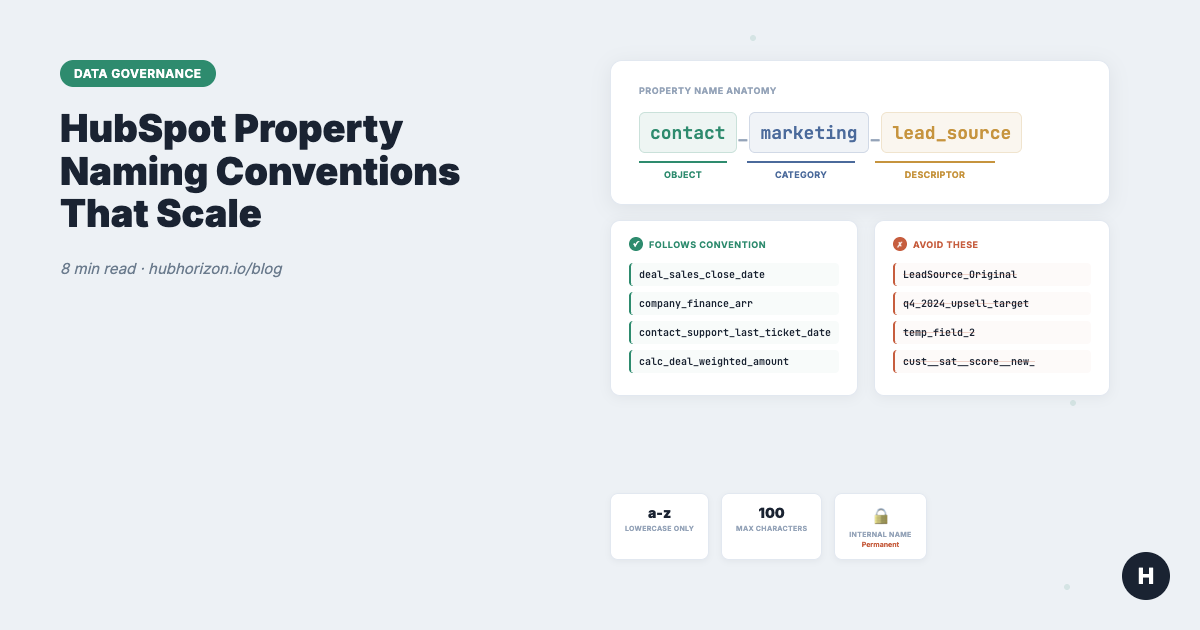
This is documented in HubSpot's knowledge base and confirmed across dozens of Community threads: internal property names cannot be edited after creation. The allowed characters are lowercase letters, numbers, and underscores. Maximum 100 characters. Must start with a letter.
Three consequences make naming conventions non-optional:
Bad names are permanent. If someone creates a property called temp_field_2 or test_data, that internal name exists until the property is deleted. Renaming means creating a new property, migrating data, updating every workflow and integration reference, and archiving the old one. For a property referenced in 15 workflows, that's a multi-hour project.
Everything references internal names. Your API integrations, workflow branches, calculated properties, and reports all use the internal name. When two properties have similar internal names (lead_source vs leadsource vs lead_source_original), debugging which one is actually being used requires checking every reference individually.
HubSpot auto-generates internal names from labels. If you type "Customer Satisfaction Score" as the label and don't manually set the internal name, HubSpot generates customer_satisfaction_score automatically. That's fine. But if someone types "Cust. Sat. Score (NEW)", you get cust__sat__score__new_. That internal name is now permanent, and it tells nobody what the property actually tracks.
The research backs this up. HyphaDevio's CRM architecture guide found that teams routinely create 200+ custom properties when 40 would suffice, with 30-40% reduction achievable after deduplication. In my own audits, the average portal has 300-500 custom properties and only 30-40% are actively used. A McKinsey Global Institute study found that workers spend roughly 20% of their time searching for internal information. Inconsistent property names make that search harder.
The naming framework
After working with dozens of portals, this is the framework I recommend. It's not the only valid approach, but it's the one that causes the fewest problems as teams grow.
Format: [object]_[category]_[descriptor]
Object prefix
Use contact_, company_, deal_, or ticket_ when the property could be confused with a similar field on another object. Skip the prefix when the property belongs to only one object and the context is obvious (a deal property called amount doesn't need deal_ in front of it).
Category
Group properties by business function, not by team. Teams change. Functions don't.
| Category | Covers | Example |
|---|---|---|
marketing_ |
Campaigns, attribution, scoring, lead gen | contact_marketing_lead_source |
sales_ |
Qualification, pipeline, activity tracking | deal_sales_qualification_method |
support_ |
Tickets, satisfaction, SLA tracking | contact_support_last_ticket_date |
finance_ |
Billing, subscription, revenue data | company_finance_arr |
enrichment_ |
Third-party data (ZoomInfo, Clearbit, etc.) | company_enrichment_employee_count |
integration_ |
External system sync fields | contact_integration_salesforce_id |
Descriptor
The descriptor is the specific thing the property measures. Rules:
- Use descriptive nouns, not verbs
- Add a type suffix when the data type isn't obvious:
_date,_count,_flag,_score,_url - No abbreviations except universally understood ones:
url,id,mrr,arr - Keep it under 50 characters total (the limit is 100, but shorter names are easier to work with)
Lifecycle prefixes
Some properties serve special purposes. Mark them:
| Prefix | Purpose | Example |
|---|---|---|
calc_ |
Calculated / formula properties | calc_deal_weighted_amount |
import_ |
Import-only fields (not shown in UI) | import_original_source_id |
legacy_ |
Deprecated, kept for historical data | legacy_old_lead_score |
sync_ |
Bidirectional integration sync | sync_netsuite_customer_id |
Good vs bad: the full table
| Bad name | Problem | Better name |
|---|---|---|
LeadSource_Original |
Mixed case, vague qualifier | contact_marketing_lead_source |
industry |
Ambiguous — which object? What values? | company_enrichment_industry |
phone_number |
Duplicates HubSpot default phone |
(Use the default property instead) |
q4_2024_upsell_target |
Time-bound name creates permanent debt | deal_sales_upsell_target_flag |
temp_field_2 |
No one knows what it stores | contact_support_escalation_flag (or delete it) |
cust__sat__score__new_ |
Auto-generated from sloppy label | contact_support_satisfaction_score |
last_contacted |
Missing type suffix, ambiguous scope | contact_sales_last_activity_date |
data_from_import_dec |
Describes origin, not purpose | contact_enrichment_firmographic_source |
The rules that prevent sprawl
A naming convention is worthless without the process to enforce it. These six rules are what actually keep a portal clean.
1. Search before you create. Before creating any property, search by keyword for existing properties that might already track the same data. The HyphaDevio research found three departments independently creating lead source properties (lead_source_campaign, campaign_source, utm_campaign_source) because nobody searched first. Check unused properties too — the field you need might already exist with zero fill rate because the last team abandoned it.
2. One person creates properties. The data governance policy explains why: the person who wants the property submits a request. The property owner (someone who understands the schema) creates it with the correct name, type, group, and description. This prevents the addition bias that causes sprawl. HubSpot does let you restrict property creation permissions — use that setting.
3. No campaign-specific names. q4_2024_upsell_target is permanent technical debt. The campaign ends. The property stays. Name properties for what they measure, not what project prompted their creation. Use lists and workflows for campaign-specific segmentation instead.
4. Document at creation. Every property gets a description explaining what it stores, who populates it, and what uses it. HubSpot has a description field for every property. In my audits, 60-70% of custom properties have no description or unhelpful ones like "Custom field" or "Data from import." If you can't explain what a property does in two sentences, question whether it should exist.
5. Group by function, not by team. Property groups should mirror your category system (Marketing, Sales, Support, Finance, Enrichment, Integration), not your org chart. Teams reorganise. Functions stay stable. A property group called "Sarah's Team" is useless after Sarah leaves.
6. Dropdown over free text. Whenever a property's values should be consistent, use a dropdown or radio select instead of free text. Free text for industry is how you end up with 94 unique values for 15 industries. Controlled vocabularies are naming conventions for property values, and they matter just as much as naming conventions for property names. This ties directly to the validity dimension of data quality.
What to do about properties you already named badly
If your portal has been running for more than a year, you already have badly named properties. Every portal does. The question isn't whether to fix them — it's which ones to fix first.
Step 1: Audit against your convention. Run your property list against the naming framework above. Flag every property that doesn't conform. The property hygiene guide covers how to do a full property audit. A data quality audit gives you the broader baseline.
Step 2: Prioritise by integration exposure. Properties referenced by external integrations are the most dangerous — a badly named property that feeds into Salesforce, your marketing automation platform, or your data warehouse creates confusion across systems. Fix these first.
Step 3: The migration pattern. For each property you need to rename:
- Create a new property with the correct internal name
- Copy data from old to new via workflow (for simple copies) or API batch update (for large volumes)
- Update every workflow, report, calculated property, and integration reference from old to new
- Verify data integrity in the new property
- Archive the old property (don't delete yet — keep it for 90 days in case something was missed)
Before archiving, export the property history if you need an audit trail.
Step 4: Don't fix everything at once. Batch migrations by object. Do Contact properties this quarter, Company properties next quarter, Deals the quarter after. A comprehensive rename project that tries to fix 200 properties in one sprint will break things. A steady cadence of 20-30 properties per quarter is sustainable and gives you time to verify integrations after each batch.
For properties with no integrations, no workflow references, and low fill rates — just archive the old one and create a new one. Don't bother migrating data that nobody uses.
Naming conventions and AI
If your team is investing in Breeze AI features, naming conventions affect AI performance in a way most teams don't expect. AI tools use property names and descriptions as context when generating outputs. A property called contact_marketing_lead_source with a description "How the contact first entered our database" gives Breeze useful context. A property called ls_orig_v2 with no description gives it nothing.
HubSpot added Breeze-powered property creation in late 2025 — you can describe what you need in natural language and Breeze creates the property with validation rules. But Breeze doesn't enforce a naming convention. It generates an internal name from whatever you describe. If your team uses Breeze to create properties without a convention in place, you'll get consistent-sounding labels with inconsistent internal names. The convention still needs to come from your team.
The business case for data cleanup covers the financial cost of these problems in detail. Every hour spent debugging a property mapping issue or figuring out which of three similarly named fields is the right one is an hour not spent on pipeline.
Frequently Asked Questions
Can you change a HubSpot property internal name?
No. HubSpot locks the internal property name at creation. You can change the display label (what users see in the UI), but the internal name used by APIs, workflows, and integrations cannot be edited. If you need a different internal name, you must create a new property with the correct name, migrate data from the old property, update all references, and then archive the old one.
What naming convention should I use for HubSpot properties?
The object_category_descriptor format works well at scale. Use an object prefix when needed for clarity (contact_, deal_), a category for business function (marketing_, sales_, support_), and a descriptive name for what the property measures. Add type suffixes (_date, _count, _flag) when the data type isn't obvious. Keep internal names under 50 characters, use lowercase with underscores, and avoid abbreviations.
How many custom properties should a HubSpot portal have?
A healthy mid-market portal typically has 50-150 active custom properties across all objects. Above 200, you should audit for duplicates and unused fields. The issue isn't the absolute count — it's the ratio of active, documented, well-named properties to abandoned ones. HubSpot allows up to 1,000 custom properties per object on standard tiers, but reaching that limit usually indicates serious sprawl. If more than 30% of your custom properties have fill rates below 10%, naming conventions alone won't fix the problem — you need a full property hygiene programme.
Does HubSpot enforce naming conventions?
Not for property names. HubSpot auto-generates an internal name from the display label you type (converting to lowercase with underscores), but it doesn't enforce a convention. If someone types "Cust Sat Score NEW!!" as the label, the internal name becomes cust_sat_score_new__ and that's permanent. The only enforcement mechanism is restricting who can create properties (via HubSpot permissions) and routing creation through a property owner who follows your convention.
Check your property naming health at hubhorizon.io — see naming convention compliance, duplicate detection, documentation coverage, and fill rates across every custom property in your portal. View pricing plans for continuous monitoring that catches naming violations as they happen.
Peter Sterkenburg is the founder of HubHorizon, a portal health platform for HubSpot. He's seen enough portals with three variations of the same lead source field to know that naming conventions aren't bureaucracy — they're architecture.
Related articles
The HubSpot Pipeline Management Cheat Sheet: Views, Signals, and Reviews in One Place
One-page HubSpot pipeline reference: 6 deal health signals, warning thresholds, 9 saved view recipes, stage design checklist, and review prep guide.
Read articleYour HubSpot Pipeline Is a Data Structure. Most Are Broken.
Your deal pipeline is a data structure. When stages, exit criteria, and required properties break, forecasting and AI produce garbage. Diagnose and fix it.
Read articleWhy Your HubSpot Sales Forecast Is Wrong — and It's Not a Process Problem
Most forecasting failures are data failures, not process failures. Diagnose and fix the data foundation your HubSpot forecast depends on.
Read article